
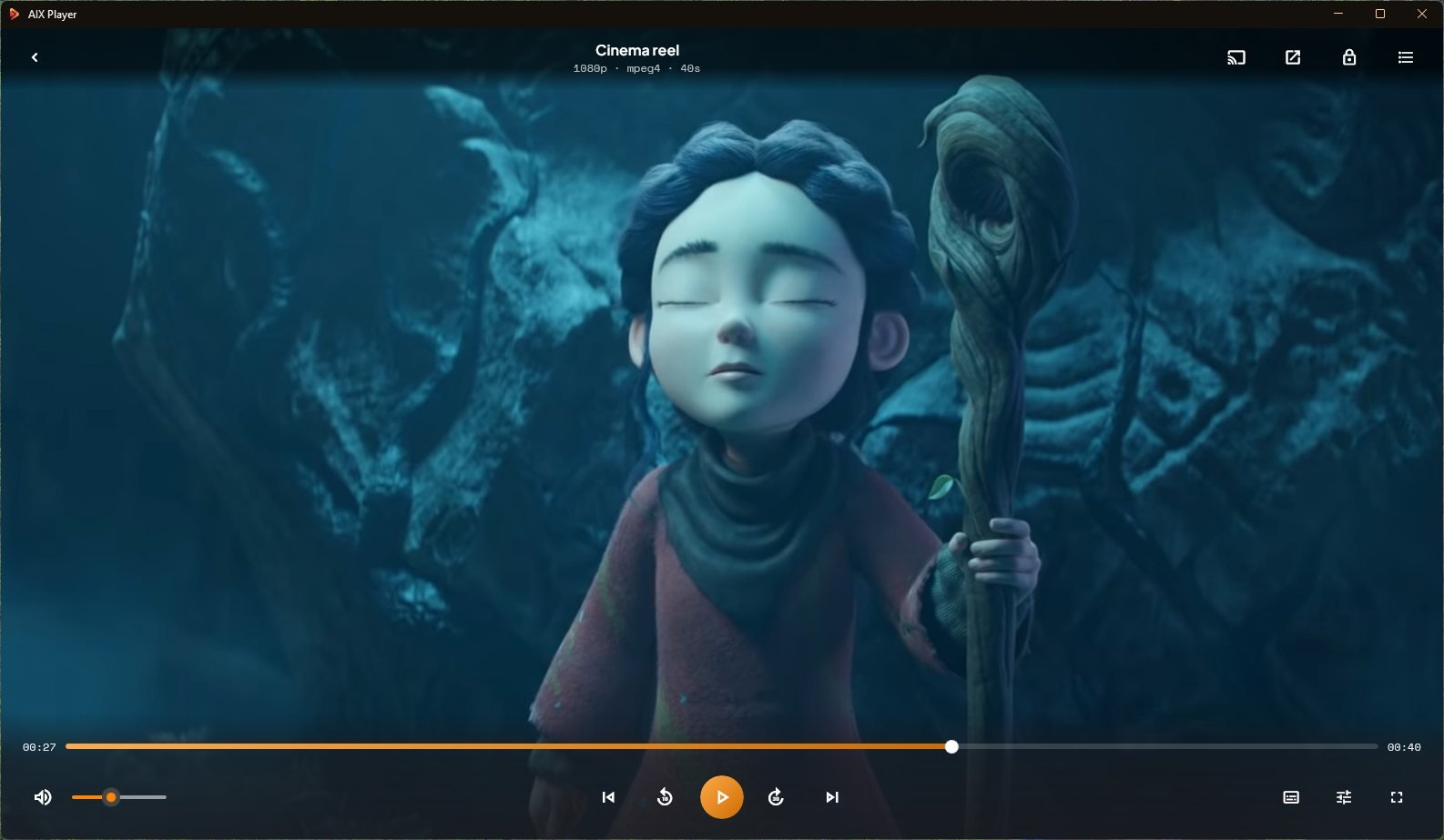




Every video. Every screen.
Play anything in beautiful 4K HDR, turn on subtitles with a tap, and send it straight to your TV.
Playback is free. Casting includes 60 minutes in total. Pro is US$17.99 a year or US$59.99 once (normally US$79.99; sale ends 30 Nov 2026).
On Windows today. On everything else next.
Windows is the only platform AIX Player is released on today. Mac, iPhone, iPad and Android versions are in development, with no release date yet — the same player, the same library, the same one-tap casting.
Your videos have more to give.
The gap between “it opened” and “that looked incredible” is made of small things — a file that refuses, a subtitle a half-second late, a laptop roaring through a 4K scene. AIX Player closes every one of them, and then puts the result on your television.
One app. All seven TV families.
Google Cast, Fire TV, Roku, Apple TV, LG webOS, Samsung Tizen and DLNA TVs — AIX Player finds them on your network by itself.
If your TV can't play a file, it converts on the fly using your graphics chip — and your subtitles render right on the TV screen.
The file that wouldn’t open, opens
No error, no hunt for something to install, no converting it first. Every format and codec is already inside the app — MKV, MP4, HEVC, AV1, disc rips and files from 2004 alike.
Fixes the film, not just plays it
Subtitle a half-second late? Nudge it. Dialogue too quiet under the music? Boost it. Scene too dark to follow? Lift it. All from inside the player.
Your laptop stays quiet and charged
Heavy 4K normally means roaring fans and a battery gone by the second act. Here the work goes to the part of your PC built for video, so neither happens.
4K that actually looks like 4K
Real HDR and 10-bit on your PC, so a night sky is smooth instead of stepped. And the heaviest files play without a single dropped frame.
Copilot+ laptops finally play 4K properly
On a Snapdragon machine most apps run through a translation layer, and video suffers worst. AIX Player is built for that processor directly — so it runs like it should.
No ads. Not one, anywhere
Not on launch, not before a film, not tucked into your library. Playing your own videos is free and unlimited, and stays that way.
And everything else it does.
The controls a good player should have, all built in and all a click away — no menus to dig through and nothing extra to install.
If it's a video, it just plays.
Practically every format and codec is built in — 83 video file types. No add-ons, no extra downloads, no converting first — open the file and watch.
Colors the way they were meant to look.
True 4K HDR with over a billion shades of color. HDR10 is tone-mapped to your display, so bright skies and dark corners keep their detail instead of washing out.
Decoding and tone mapping run on your graphics chip — Intel, AMD, NVIDIA or Qualcomm — where the format and your hardware support it, with a software fallback when they do not. HEVC, AV1 and 10-bit HDR all decode on that hardware, so heavy 4K files play smoothly while your laptop stays cool and quiet.
Every control, one reach away.
A subtitle running late, an audio track in the wrong language, a scene too dark to see — fix it all without ever leaving the video.
Built native for Snapdragon and Arm64 PCs.
Most Windows apps were written for Intel chips, so on a Snapdragon machine they run through a translation layer. It works, but every instruction takes a detour — and video is the worst case for it, because a film is thousands of frames that each have to be decoded in time.
AIX Player ships a true Arm64 build, compiled for the processor in your machine. Decoding runs on the machine’s own video block, and casting uses its hardware video encoder, with nothing translating in between — which is what makes it this efficient: 4K HDR that stays smooth, a laptop that stays cool, and a battery that lasts the length of the film.
Cast anything.
To almost any TV.
One tap sends what you're watching to the big screen in full 4K HDR — with your subtitles rendered in. AIX Player connects straight to the TV, so the picture stays sharp instead of the blur you get from mirroring.
Your TVs appear on their own, grouped by what they can actually do — no setup, no hunting through menus.
When several devices could take the film, AIX Player marks the one it ranks highest for that television.
Play, pause, seek, change volume, switch subtitles or disconnect — all without getting off the sofa.
Pick a device for its step-by-step guide. New walkthroughs are added to the Help Center as they are written.
Playback is free. Casting includes 60 minutes in total. Pro is US$17.99 a year or US$59.99 once (normally US$79.99; sale ends 30 Nov 2026).
Your library, wherever it lives.
Nothing to copy, nothing to convert. Play straight from this PC, an external drive or a pasted link — AIX Player opens it where it already lives.
What AIX Player can do.
Eight areas, every feature. Pick one to see what is inside.
AIX Player decodes HEVC/H.265, AV1, H.264 and VP9 inside the app, and runs natively on Intel, AMD and Snapdragon (Arm64) Windows machines — not through a translation layer — and decodes video on your graphics card rather than your main processor.
It casts to Chromecast, Google TV, Android TV, Fire TV, Roku, Apple TV, LG webOS, Samsung Tizen, Sony Bravia, NVIDIA Shield and DLNA televisions. Subtitles are rendered onto the picture before it leaves the PC, which is why they appear on any television regardless of what that television supports — external subtitle files included.
Your library
Every film you own, gathered and kept tidy without you lifting a finger.
Playback
The controls you reach for while a film is running.
Picture
4K, HDR and 10-bit are free for everyone; the studio controls are the Pro part.
Sound
Every soundtrack the file carries, and the controls to make it sit right in your room.
Subtitles
Loaded, restyled, retimed — and they still arrive when the film goes to the television.
Cast to TV
Seven television families, found for you, with the subtitles already on the picture.
Sources
Wherever the file already lives — nothing is copied, moved or renamed to get at it.
Personalise
The app bends to how you work, and every setting can be put back.
Installing a video player should not be a risk.
Most trouble with video software starts with where it came from — a download site, a bundled extra, something asking for an account it does not need. None of that applies here.
Questions, answered.
The things people ask most often, before and after installing.
Is AIX Player free, and are there ads?
Playback is free and unlimited. Casting is free for a one-off 60 minutes. Every video you play on your PC is free forever — 4K, HDR, 10-bit, every format, no ads, no trial. Casting videos to your TV is the premium part: you get 60 minutes in total — once, not per session — to try it properly, and Pro lifts the limit for unlimited casting to every TV you own. We would rather tell you that here than have you discover it mid-film.
Is AIX Player safe to install?
Yes. It comes from the Microsoft Store, so the package is reviewed by Microsoft, signed and sandboxed. No download-site installer, no bundled extras, nothing to untick during setup.
Do I need to create an account or sign in?
No. Install it from the Store, open a video, and it plays. Nothing to set up first.
Why install another video player at all?
For two things you have probably already hit. Files that simply will not open — an MKV, a film copied from a disc — and getting them onto the television without converting anything or losing the subtitles on the way. If neither has ever bothered you, you may genuinely not need this.
What are the system requirements?
Windows 11, or Windows 10 version 2004 (build 19041) or later, 64-bit. There are versions made for Intel, AMD and Snapdragon machines alike, so a Copilot+ laptop runs it directly rather than through a translation layer. Any graphics card from the last few years handles 4K HDR comfortably, and older machines still play everything.
Does it need an internet connection?
Not for your own files. Anything on your PC or an attached drive plays completely offline. Casting needs your PC and TV on the same home network, but the video travels straight to the television rather than out over the internet. Only a pasted stream URL needs a live connection.
Will it slow down my PC?
No — usually the opposite. Decoding every frame on your PC’s main processor is what makes fans roar and batteries drain. AIX Player passes that work to your graphics card instead, which is built for it — so your machine stays free for whatever else you are doing.
What languages is the app available in?
17 languages. The interface follows whichever language Windows is already set to. Subtitle and audio tracks are separate — those come from the file you are watching, and you can switch freely.
Can I play a video that is still downloading?
Usually yes, if it downloads in order. A partly complete file will play up to the point it has reached. Torrents that download in pieces often will not, because the beginning may not be there yet — wait for it to finish and try again.
Why does my video file say it is corrupted?
Nine times out of ten it is incomplete, not corrupt. An interrupted download or a copy that failed part-way leaves a file that looks whole but is not. AIX Player will play as much as exists, which is a quick way to tell: if it stops at the same point every time, that is where the file ends.
Does it play MKV files on Windows 11?
Yes, straight away. That includes 4K HDR and 10-bit MKV, with every audio and subtitle track inside available to switch between. MP4, AVI, MOV, TS, M2TS, WebM, FLV, WMV and 76 more work the same way.
Do I need anything extra to play HEVC / H.265?
No. Everything AIX Player needs to open your files is already inside the app. Many PCs are missing what Windows needs for HEVC (H.265) and AV1 — AIX Player brings its own decoders, so it does not matter. Big 4K files stay smooth because your graphics card does the work.
Why is my video playing with sound but no picture, or showing a black screen?
Your PC can read the sound half but not the picture half. The video is usually HEVC (H.265) or AV1, and Windows has no decoder for those on many machines — so you get audio and a black screen, or an error about the file not playing. AIX Player brings its own, so the picture and the sound arrive together.
Why is there no sound on my MKV file in Windows 11?
It has a cinema-style surround soundtrack your PC cannot read. Films copied from discs usually keep the full surround mix from the cinema, and most computers have no way to play it — so you get picture and silence. AIX Player plays it, and keeps all the surround channels rather than squashing them into plain stereo. Nothing to install.
A file won't play. What now?
Try it from another folder first. Practically every kind of video file is supported, so this is rare — a file that plays nowhere is usually damaged or only partly downloaded. Genuinely stuck? Send us the file details and we will look into it.
Why won’t my AV1 video play?
It will play here. AV1 is a newer kind of video file, and only recent computers can handle it on their own. AIX Player brings what it needs, and on newer machines it lets the graphics card take over so playback stays light.
Will Blu-ray rips play? My files are .TS and .M2TS
Yes. TS, M2TS and MTS open directly, with chapter marks and the full surround soundtrack intact. These files usually pair an advanced video track with a studio surround mix — both are handled.
My video has a green, pink or distorted picture
It is your graphics software, not the file. Your graphics card is stumbling on that one type of video. AIX Player quietly switches to a different way of playing it so the colours come back — and updating your graphics drivers fixes the root cause.
Why won’t my AVI file play on Windows 11?
Modern Windows dropped what those older files need. AVI and the video inside it date from the 1990s, and Windows no longer includes the pieces to open several of them. AIX Player carries them inside the app, so a file from 2004 opens just as easily as a 4K one — and nothing is changed on your PC.
My MOV file won’t open on Windows. What now?
It will open here, with nothing from Apple installed. MOV is what iPhones and most cameras record in, and Windows has always been awkward with it. Plenty of guides still tell you to install QuickTime — you should not, it has been discontinued for years. AIX Player reads MOV directly, including HDR and slow-motion recordings from recent iPhones.
Can I cast an MKV file to my TV without converting it first?
Yes. Nothing to convert first and no renaming .mkv to .mp4 to trick the TV — pick the file, pick your TV, press cast. If your TV genuinely cannot handle a file, AIX Player converts it while it plays, so the film still starts straight away.
Read the full guideWhy do my subtitles disappear when I cast to the TV?
Because they never leave your PC. Most casting sends the television the video file alone. AIX Player draws the subtitles into the picture before it travels, so what arrives already has them — external .srt files included, in the size and style you chose.
AIX Player can't find my TV.
Nearly always one of these, in order of likelihood:
Casting stutters or drops out.
Your Wi-Fi is the bottleneck. A wired PC, or a spot closer to the router, fixes most of it. Very large 4K files ask a lot of a weak network — and if your TV cannot handle a file as it is, AIX Player quietly converts it while it plays so you never see an error.
My Roku is not showing up when casting from my PC
It is almost always the network. Roku sets and sticks appear on their own, so check that your PC and TV are on the same Wi-Fi — guest and split-band networks keep them apart — and that the Roku is awake. Roku is also the one device that needs a piece added to it: our free AIX Casting Receiver channel, added once from your Roku account with the code PG26GTJ. AIX Player hands you the link if it is missing.
There’s no sound when I cast to the TV
Your TV could not play the soundtrack. It is usually the cinema surround mix that comes with films copied from discs, and most televisions cannot handle it. AIX Player converts it as it goes; if the film has more than one soundtrack, switching to a plain stereo one also fixes it instantly.
Will I be able to cast every video format to my TV?
Yes — even the ones your TV cannot read. Televisions only understand a short list of video types, so a file outside that list is where casting usually breaks down. AIX Player checks what your TV can take, and where a file falls outside it, converts just that part on the fly while the film plays. Your original file is never touched and nothing is saved to disk.
Does converting on the fly make the picture worse?
No — and usually nothing is converted at all. AIX Player only changes the part your TV genuinely cannot read, which is very often just the soundtrack, leaving the picture untouched at full quality. When the video itself does need converting, it is done on your graphics card in real time, so 4K and HDR are preserved rather than downgraded to get it moving.
Why does casting start instantly instead of converting first?
Because the conversion happens as the film plays. Other approaches make you convert the whole file first and wait, sometimes for hours. AIX Player converts frame by frame while streaming, using the dedicated video hardware in your graphics card, so the film appears on the TV within seconds no matter how large it is.
Can I cast from my laptop to my TV without a Chromecast?
You probably do not need one. If your television is a Samsung, LG or Sony smart TV, AIX Player connects straight to it using what is already inside the set. The same is true of Fire TV, Roku, Apple TV and Android TV boxes you may already own — and for older televisions there is usually a route in as well. Nothing to buy and nothing to plug in.
Why does 4K video stutter or lag on my PC?
Your PC is using the wrong part of itself to do the work. The main processor is grinding through every frame while the graphics card — the part actually built for video — sits idle. AIX Player gives the job to the graphics card, so even huge 4K files run smoothly, fans stay quiet and a laptop keeps its charge.
HDR looks washed out or too dark.
The film holds more brightness than your screen can show. HDR films are made for very bright displays, so on an ordinary monitor the extremes get cut off and everything looks flat. AIX Player reshapes the picture to fit your screen, so bright areas and shadows both keep their detail. You can fine-tune brightness and contrast too.
There's no sound.
Switch the audio track. Films often carry several and the first is not always the right one — open the audio menu and pick another. Also worth checking Windows is playing to the device you expect: headphones, TV or speakers.
Dialogue is too quiet against the music. Anything I can do?
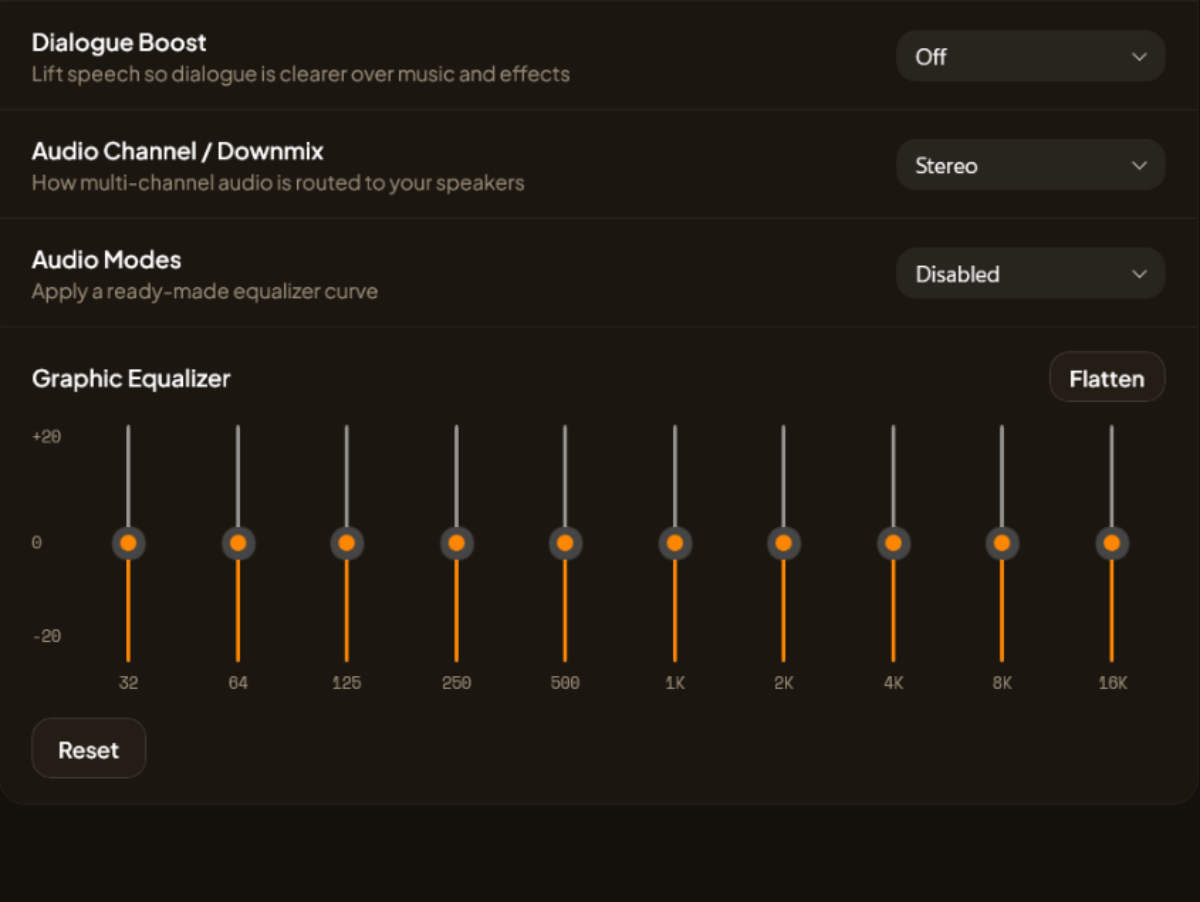
Yes — three controls help. The 10-band equaliser is free for everyone. Dialogue boost, which lifts speech over music and effects, and loudness levelling, which evens out the loud scenes for late-night viewing, are part of AIX Player Pro.
The audio is out of sync with the video
Nudge the audio delay. Shift the sound earlier or later while the film keeps playing, until lips and words agree. The offset stays with that file, so it is a one-time fix. Subtitles have their own separate timing control.
Why is my video stretched, squashed or cropped?
It is being shown at the wrong shape. Older recordings and phone clips sometimes carry the wrong information about how wide they should be. Change the shape setting to fit the frame properly, or zoom in to fill the screen. Clips filmed sideways can be rotated too.
Will it play studio surround soundtracks?
Yes. Surround soundtracks keep all their channels rather than being squashed into plain stereo, so a film sounds the way it did in the cinema. It matters for casting too — many televisions cannot play these soundtracks, so AIX Player quietly converts them on the way.
My video plays in slow motion or too fast
Check the playback speed first. It stays wherever you last left it, so one tap returns it to normal. If that is not it, footage shot on a phone or camera at a very high number of frames per second can look odd on a screen running at a different rate.
Why is the video full screen but tiny in the middle?
The black bars are part of the picture itself. Some copies have them permanently built in, so going full screen just makes the bars bigger too. Zoom in to fill the screen properly, and AIX Player remembers that setting for the file.
The picture is fine but the video keeps freezing
Usually the drive it is stored on. A slow external drive or a failing disk cannot feed the film fast enough, even when the rest of your PC is coping easily. Copy the file onto your PC to test — if it plays smoothly there, the drive was the problem.
Is there a video player for Windows with a built-in equaliser?
Yes, with ten bands and ready-made presets. Start from a curve made for films, music or voice, or set it by hand. The trick most people miss is to cut what is in the way rather than boost what is not — easing off the deepest bands does more for clarity than raising anything. Whatever you set is remembered for that file.
Can I take a screenshot of a video frame?
Yes, at full quality. Capturing from the player saves the frame at the film’s own quality, rather than the shrunken version your monitor is showing — noticeably sharper with 4K films.
How do I turn subtitles on or off while watching?
One key, or one tap in the subtitle menu. Subtitles toggle without pausing the film, and the track you pick is remembered for that file so you do not set it again next time.
Can I change the subtitle font size on a PC?
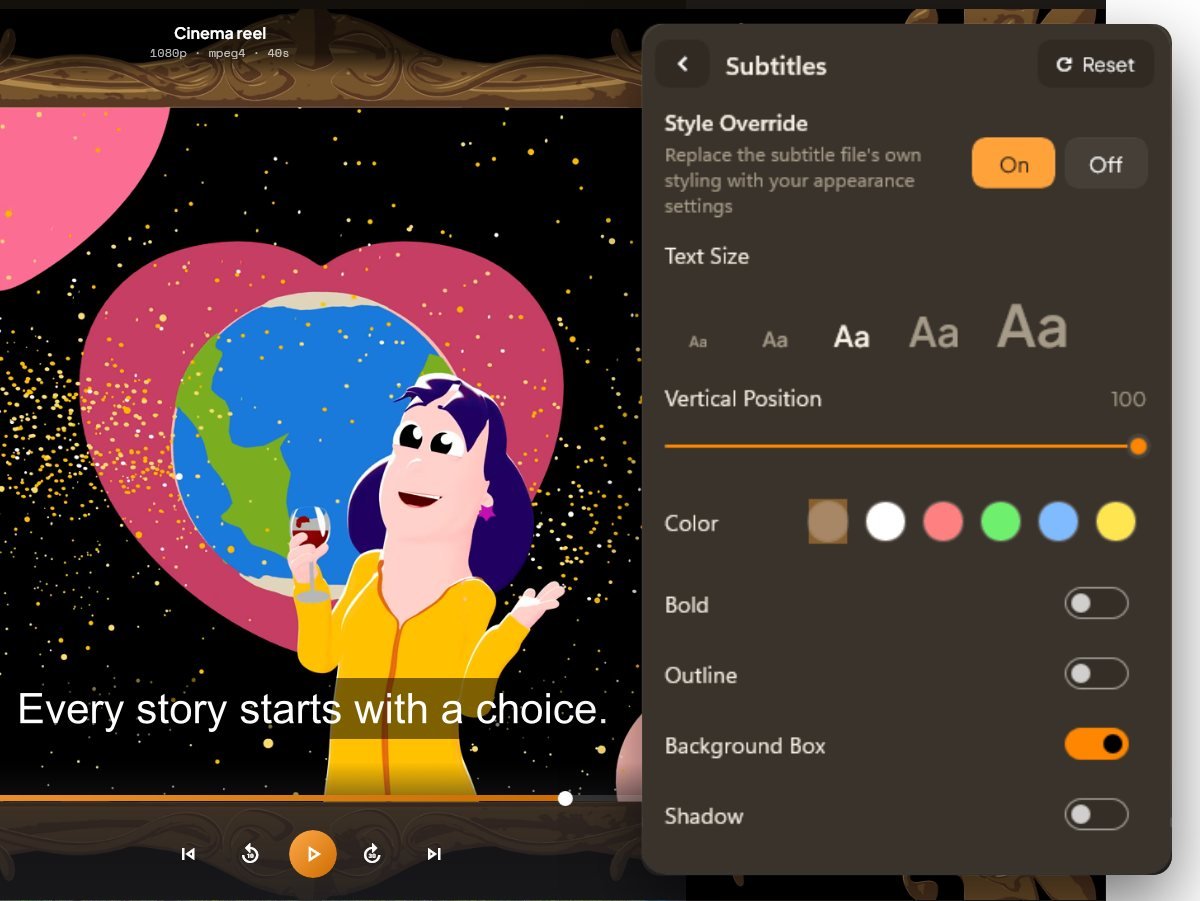
Yes — size, colour, outline and a backing box. Set them large enough for how far you sit from the screen. If you cast to a television afterwards, that styling travels with the picture, so size for the room rather than the desk.
Why are my subtitles in the wrong language?
A film often includes several, and the first is not always yours. Open the subtitle list and pick the right one. If one option only shows a handful of lines, that is the kind meant just for foreign dialogue — working as intended, not broken.
Can I move subtitles higher up the screen?
Yes, vertically. Useful when lines sit over on-screen text or fall into the black bar at the bottom. If subtitles ever seem to vanish entirely, position pushed too far is a common cause — resetting the styling brings them back.
Where can I get subtitles for a movie?
From any subtitle site, then load the file directly. You do not need to rename it to match the video. Open the subtitle menu, point AIX Player at the file wherever it saved, and it loads immediately. SRT, ASS, VTT and disc-style image subtitles all work.
Can I burn subtitles into the video permanently?
Not into the file, but they are burned in when casting. Your original file is never modified. When you cast, subtitles are rendered onto the picture before it leaves the PC — which is exactly why they reach televisions that cannot read subtitle files at all.
My subtitles aren't showing.
Load the file from the subtitle menu. No need to rename anything to match the video. Once it is on, you can restyle the text size, colour, outline and background box to suit the room you are watching in.
My subtitles are out of sync. Can I fix the timing?
Yes. Shift them earlier or later while the film keeps playing, until the words land with the lips. The offset sticks for that file, so you only do it once. Audio can be nudged the same way if the sound is what drifts.
My subtitles show strange symbols or question marks
The subtitle file was saved for a different alphabet. That is why accented letters and non-English characters turn into boxes and question marks. AIX Player understands the usual ones, so files that looked broken elsewhere normally read correctly here — and another subtitle file for the same film will almost always work.
Does it remember where I stopped watching?
Yes — every file, individually. Close one mid-film, open it a week later and it picks up where you left off. Your library shows how far through each one you are, and you can drop named bookmarks on moments worth returning to.
Can I watch a video while I work in other apps?
Yes. Picture-in-picture floats the video in a corner over whatever else you are doing, and a mini player keeps it going while you browse the rest of your library. Playback speed goes to 2× for long material.
Can I play videos from a USB drive, SD card or external hard drive?
Yes, directly. External drives, USB sticks, memory cards and phones plugged in over USB all open in place, with nothing to copy to the PC first — and you can cast straight from them too. A very slow or old drive can make big 4K films stutter, and copying that one file onto your PC solves it.
How do I make AIX Player the default video player?
Right-click a video, Open with, Choose another app. Pick AIX Player and tick Always use this app. From then on every video of that type opens in it. Repeat once for each file type you keep — or set them all in Windows Settings under Default apps.
Can I play a folder of videos one after another?
Yes — open the folder and play through it. Everything in the folder queues up in order, and you can shuffle or repeat the run. For a fixed running order you want to keep, build a playlist instead and it stays saved.
Can I loop a video or a section of it?
Both. Repeat plays a file or a whole playlist over again, and A–B repeat loops just the section between two points you set — useful for practising a passage or studying a technique without scrubbing back each time.
How do I organise my video files in a video player?
Point AIX Player at the folders they live in. It builds a library with thumbnails, durations and how far through each file you are, shown as a poster grid or a detailed list. Nothing is moved or renamed on disk — your folders stay exactly as they are.
Is there a video gallery view with thumbnails?
Yes — grid or list, whichever you prefer. Every file gets a thumbnail, its length and a progress bar for what you have already watched. Switch to a list when you want file sizes and formats visible instead.
How do I find a video quickly in a large collection?
Search across the whole library, then sort. Sort by name, size, date added or file type, ascending or descending. Past a few hundred files this is far faster than opening folders one at a time.
Can I select several videos at once?
Yes, and act on all of them together. Multi-select lets you favourite a batch, add them to a playlist or remove them in one action rather than repeating yourself for each file.
Can I see a folder’s contents before opening anything?
Yes — folders preview in place. Peek inside to see what is there, then drill into subfolders without losing your place. Useful when a drive has dozens of similarly named directories.
Where do I see a video’s quality and file size?
On its details page, all together. Quality, video type, length and file size on one screen — the quickest way to check whether a file really is the 4K version you thought you downloaded.
Can I delete or rename videos from inside the player?
Removing is there; renaming happens in Windows. You can remove files from the library or from disk, and multi-select makes clearing out a folder quick. Renaming stays with File Explorer, so the player never changes your filenames behind your back.
Does it run natively on Snapdragon and Copilot+ PCs?
Yes, with a version built for those machines. Most apps on a Snapdragon laptop run through a translation layer, which slows them down and drains the battery. AIX Player has a version made for that processor directly, so nothing is being translated — 4K HDR stays smooth, the laptop stays cool and the battery lasts.
I changed PC — how do I get my purchase back?
Sign in to the Store with the same account. Your purchase travels with the account, not the machine — install AIX Player and it is restored. If it does not appear, get in touch and we will sort it out.
When are Mac, iPhone and Android coming?
They are in the works. Windows is the only released version today. The others are in development and we have not set a date for them — they will use the same playback engine and the same casting.
Get AIX Player.
Install in seconds and open your first file. Windows only for now; Mac, iPhone, iPad and Android are in development.
