
Cast video to Chromecast from PC
Whatever the file is, it can go on the television — and it should not need converting first, or cost you the subtitles on the way. Here is how casting works from a Windows PC, what you keep control of while it plays, and what to do when a file stops at the TV.
Supported videos from your PC can be cast to Chromecast, up to 4K HDR where the source, PC, network and TV support it, with selected subtitles rendered on screen. AIX Player converts unsupported parts while streaming when needed.
Which files can I cast?
AIX Player supports a broad set of files, including MKV, MP4, MOV, AVI, WMV, FLV, TS, M2TS and WebM with HEVC/H.265, AV1, H.264, VP9 or MPEG-4 video. You do not need to prepare a separate converted copy; AIX Player converts unsupported parts while streaming when the device requires it.
What to expect on a Chromecast
- Plays directly: H.264, HEVC, VP8, VP9 and AV1 video, up to 2160p (4K) at 60 frames per second on the models that support it.
- HDR formats: HDR10, HDR10+, HLG and DV HDR, on the models that support them.
- HDR: HDR stays HDR when the TV can play the file directly; otherwise the picture is converted to SDR for the TV.
- Sound: a file the TV plays directly keeps its own soundtrack; every stream AIX Player converts carries AAC sound.
- Subtitles: the subtitle you choose in AIX Player shows on the TV.
- Casting allowance: the free app includes 60 casting minutes in total, once, not per session; AIX Pro makes casting unlimited.
From AIX Player’s device catalogue; AIX Player checks your Chromecast before it sends anything and converts only what it cannot play. Casting an MKV? Cast an MKV to the TV. Something not working? Fix casting problems.
How do I cast it? Three steps
Jellyfin, Emby and Plex videos play on your PC; casting media-server videos is not supported. Network shares (SMB / NAS) can be browsed and played on your PC for free, with no time limit. These casting steps are for supported local files. Read about media servers.
-
Open the video and set it up how you want it
Open it from your PC’s drive or a USB or SD drive, then pick the audio track and choose the subtitle. The soundtrack and subtitle you choose are the ones the TV gets.
-
Press cast
AIX Player finds the televisions on your network by itself and lists them by the names you gave them, grouped by what each one can actually do. When more than one could take the film, it marks the device it ranks highest for that television.
-
Sit down — your PC is the remote
Play, pause, seek, change the volume, switch subtitle or audio track and disconnect, all from the AIX Player window. Nothing is mirrored, so you can carry on using the PC while the film plays.
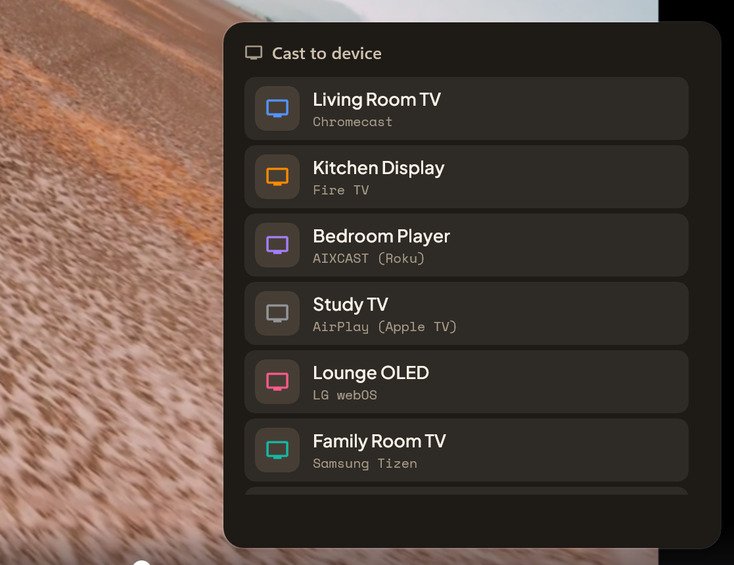
Devices appear on their own — nothing to pair by hand, nothing to type in. Film behind the cast list: Charge © Blender Foundation / studio.blender.org, CC BY 4.0.
Will my subtitles show on the TV?
This is the part that usually falls apart. A subtitle file sitting beside your video is invisible to the television, because it was never inside the video to begin with — so it is normally left behind on the PC.
AIX Player takes care of it. Choose a subtitle in the player, a track inside the video or a separate file you added, and that subtitle shows on the TV. You can switch it while the film plays. The subtitles when casting guide has the details.
What if my TV refuses the file?
Televisions decode a short list of formats, and it is often the audio that trips them rather than the video — a disc rip carrying a studio surround mix is the classic case. That is why the failure looks so odd elsewhere: a picture with no sound means the audio was refused, a black screen with sound means the video was.
AIX Player asks the television what it can handle before sending anything, then converts only the part that needs it as the film streams. On NVIDIA, AMD and Intel graphics the graphics card converts the video; on Snapdragon PCs only H.264 encoding is hardware-assisted. Nothing is written to disk and your original file is untouched. HDR stays HDR when the TV can play the file directly; otherwise the picture is converted to SDR for the TV.
What if the picture stalls?
Same network, same band. A PC on 5 GHz casting to a device on 2.4 GHz is the most common cause of stalling, and guest networks keep the two apart entirely.
Wire the PC if you can. An Ethernet cable leaves the whole wireless channel free for the television, which shows on high-bitrate 4K.
Keep the PC awake. If Windows sleeps, the stream stops with it. On a laptop, plug it in for anything feature-length.
Chromecast casting questions
Why does my Chromecast say "unable to cast"?
It is almost always the network. Your PC and the Chromecast must be on the same network — guest Wi-Fi and split 2.4/5 GHz bands keep them apart, and some routers have client isolation switched on. Check the device is awake, then reopen the cast list.
Can I cast 4K HDR to a Chromecast?
Yes, on the 4K models that support HDR. HDR stays HDR when the Chromecast can play the file directly; otherwise the picture is converted to SDR for the TV. Older 1080p Chromecasts get a matching stream instead of refusing.
Can I use my PC while casting to Chromecast?
Yes, freely. Nothing is mirrored from your screen, so you can work, browse or minimise the window while the film plays on the TV. Just do not let Windows go to sleep — that stops the stream.
Do I need the Google Home app?
No. AIX Player finds Chromecast devices on the network by itself. There is nothing to pair, no code to type and no companion app needed on the PC.
Casting to something else?
Nothing here is specific to Chromecast. The same files, the same three steps and the same subtitles reach every TV family AIX Player supports — each paired through its own protocol rather than a generic fallback, so you are not installing a different app for every screen in the house.
Put tonight's film on the big screen.
Install AIX Player, open a video, press cast. That's the whole setup.
GET IT FROM Microsoft Store