
Cast video to Google TV from PC
Google TV sets have Cast built into the software, so there is nothing to plug in and nothing to install on the television.
Supported videos from your PC can be cast to Google TV, up to 4K HDR where the source, PC, network and TV support it, with selected subtitles rendered on screen. AIX Player converts unsupported parts while streaming when needed.
Which files can I cast?
AIX can send compatible files directly or convert unsupported parts while streaming; the source and Google TV model still matter.
How does it connect to your Google TV?
AIX Player talks to your Google TV over the Cast protocol that is already part of the system. When discovery succeeds, the set appears under its advertised name.
What to expect on a Google TV
- How it plays: over Google Cast, which is built into Google TV, so there is nothing to install.
- Plays directly: H.264, HEVC, VP8, VP9 and AV1 video, up to 2160p (4K) at 60 frames per second on the models that support it.
- HDR formats: HDR10, HDR10+, HLG and DV HDR, on the models that support them.
- HDR casting uses AIX Pro or the casting trial: HDR stays HDR on a compatible direct-play route; converted video is SDR.
- Sound: a file the TV plays directly keeps its own soundtrack; every stream AIX Player converts carries AAC sound.
- Subtitles: the subtitle you choose in AIX Player shows on the TV.
- Casting allowance: the free app includes 60 casting minutes in total, once, not per session; AIX Pro makes casting unlimited.
From AIX Player’s device catalogue; AIX uses device information and the selected route to choose direct playback or conversion for your Google TV. Casting an MKV? Cast an MKV to the TV. Something not working? Fix casting problems.
How do I cast it? Three steps
Jellyfin, Emby and Plex videos play on your PC; casting media-server videos is not supported. Network shares can be browsed freely; SDR playback is unlimited, while HDR uses its trial or AIX Pro. These casting steps are for supported local files. Read about media servers.
-
Open the video and set it up how you want it
Open it from your PC’s drive or a USB or SD drive, then pick the audio track and choose the subtitle. The soundtrack and subtitle you choose are the ones the TV gets.
-
Press cast and choose your Google TV
AIX Player scans the network and lists what it finds by name. When one television offers several supported protocols, AIX ranks the available routes; Google Cast has priority when detected.
-
Sit down — your PC is the remote
Use the playback controls available for the selected TV and route; some audio or subtitle changes require a new cast. Nothing is mirrored, so you can carry on using the PC.
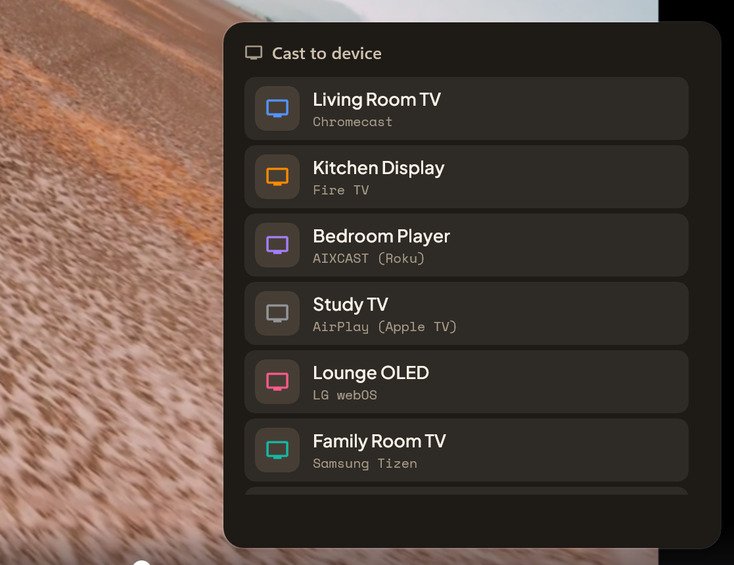
Compatible devices can appear automatically when network discovery succeeds. Film behind the cast list: Charge © Blender Foundation / studio.blender.org, CC BY 4.0.
Will my subtitles show on the TV?
Google TV can display subtitle tracks it recognises, but a separate subtitle file sitting next to your video is not one of them — it was never part of the video, so it stays behind on the PC.
AIX Player takes care of it. Choose a subtitle in the player, a track inside the video or a separate file you added, and that subtitle shows on the Google TV. Some subtitle changes work during playback; tracks that need to be drawn into the video can require a new cast. The subtitles when casting guide has the details.
What if my TV refuses the file?
Google TV devices handle a range of media formats directly. When a supported file contains something the device cannot read, AIX Player converts that part while the video streams. Supported Intel, AMD and NVIDIA graphics hardware can accelerate video conversion; on Qualcomm, only H.264 encoding is hardware-assisted, and other stages use the processor.
Google TV casting questions
My Google TV is not showing in the cast list
Check it is on standby rather than fully off. Wake the device if discovery fails, and check its network connection. Also make sure the set and your PC share the same network, not a guest one.
Is it named after the room or the model?
Look for the device’s advertised name, which may be a room name or model name.
Can I still use the TV remote while casting?
Control it from the PC. Use the available AIX playback controls; subtitle switching depends on the active route and track.
Does casting to Google TV keep subtitles?
Yes, for supported subtitle formats. The subtitle you choose in AIX Player shows on the TV, including a separate subtitle file you added.
Casting to something else?
AIX supports several TV families; setup, supported files and available controls depend on the device and route.
Put tonight’s film on the Google TV.
Install AIX Player, open a supported local video, choose the TV and follow any connection prompts.
GET IT FROM Microsoft Store